A home office setup for streamers is a measurement problem before it is a shopping list. The chair has to fit your seat depth, the desktop has to land at your seated elbow height, the screen has to sit at a monitor distance you can hold for hours, and the camera has to be somewhere your face actually is when you talk. Everything else, the glow, the branded mousepad, the second display you never look at, is decoration layered on top of those four decisions.
This is the home office setup for streamers explained in the order that survives a six-hour session: seat first, screen second, input third, capture last. If you already run a work from home setup for streamers that holds up across a long broadcast, you may need only one of the pieces below. If you are starting from a kitchen table and a laptop, the same order still applies, and the four options here cover the layers without a sponsorship budget.
Related: How to Test a Standing Desk for Wobble Before You Buy →
Quick answer
The order that matters is chair, then screen height, then keyboard angle, then camera and microphone. A home office workstation for streamers should be sized from seated measurements outward rather than from whatever desk you happen to own. Each option below fills one layer, and none of them is called the best at anything: the chair suits a body that matches its published dimensions, the mount suits a screen inside its stated load range, the keyboard stand suits one typing angle, and the capture kit suits a PC or Mac rather than a console.
4 useful options
| Model | Best fit | What stands out |
|---|---|---|
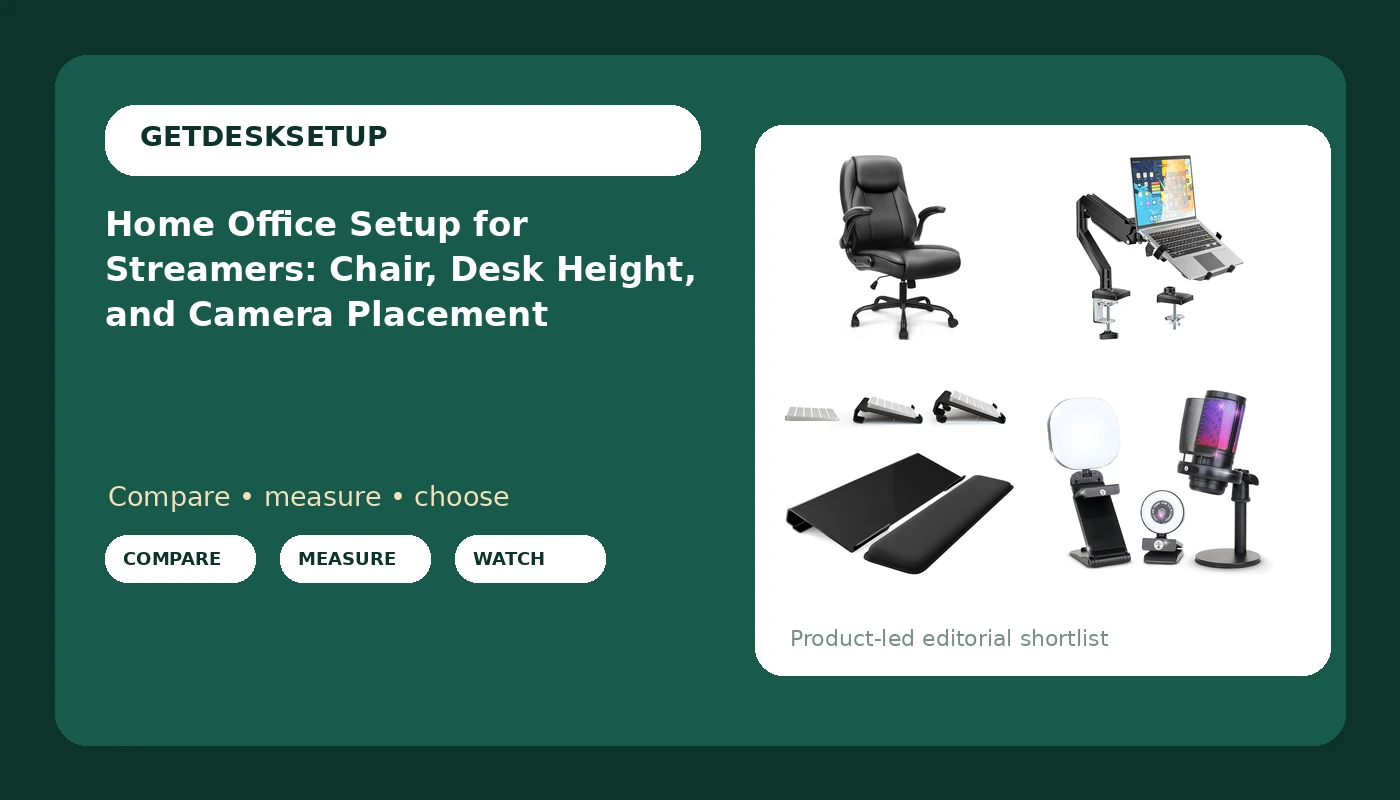
| NEO CHAIR Office Desk Chair, High Back PU Leather with Flip-up Arms, Black | The seated layer, once your measurements work | Flip-up arms that clear the desk edge when raised |
| WALI Laptop Desk Mount for 17" Notebook and 34" Screens, Holds 22-26.4 lbs | Lifting a laptop or screen off the desktop | Stated load range of 22 to 26.4 lbs and support for screens up to 34" |
| Adjustable Computer Keyboard Stand for Desktop, Keyboard Wrist Rest(Black) | Changing the keyboard angle instead of the wrist angle | Adjustable angle with a paired wrist rest |
| Webcam Streaming Kit, 1080P Webcam, RGB Mic & LED Light for PC/Mac. Not PS5 | The capture layer on a PC or Mac | Three pieces in one kit, and no console support |
The seat: NEO CHAIR Office Desk Chair, High Back PU Leather with Flip-up Arms, Black
Chair pairing is the first decision, and it is the one most streamers make backwards, buying the chair that matches the room instead of the chair that matches their seat depth. A seat pan longer than your thigh pushes you forward all night. A pan shorter than your thigh lifts your knees and hands the load to your lower back. The listing for this chair does not publish a seat depth or a weight rating, so I am not going to hand you a fit claim that the seller never made. Measure the chair you sit in now: seat depth from the front edge back to the backrest, and seat height at its lowest setting. If those numbers already work, keep what you have. If they do not, compare this one against your tape. Skip it if you need a documented lumbar adjustment or a published weight limit before you buy, because neither is stated here.
The screen riser: WALI Laptop Desk Mount for 17" Notebook and 34" Screens, Holds 22-26.4 lbs
Monitor distance is the number almost nobody checks. Sit back in your chair, extend one arm, and your knuckles should roughly touch the screen. A laptop sitting flat on a desktop fails that test twice: too close and too low. This mount addresses both by lifting the panel and letting you push it back. Two checks before you buy. First, weigh your laptop or monitor and confirm it lands inside the stated 22 to 26.4 lb range, because a mount rated under your load will droop and a mount rated far over it may not hold a light panel firmly. Second, look at the underside of your desktop where the clamp lands. A thick beveled edge, a glass top, or a thin hollow-core panel can rule out a clamp mount entirely. Skip this if your screen already sits at eye level on a stand you like, or if your desk edge cannot take a clamp.
The input surface: Adjustable Computer Keyboard Stand for Desktop, Keyboard Wrist Rest(Black)
Most keyboard tilt is backwards. Feet up at the back raises your wrists into extension, which is the position that produces the ache at hour two of a stream. A negative tilt, front edge lower than the back, is usually the better default, and a stand that adjusts is how you test that without buying a new desk. The wrist rest here is for rest, not for typing. If your wrists are planted on it while your fingers move, the rest is too close, so slide it forward and use it between sentences and during chat breaks. Skip this if your keyboard is already on a tray below desk level, or if you type standing, where a tilted board on a desktop simply gets in the way.
The capture layer: Webcam Streaming Kit, 1080P Webcam, RGB Mic & LED Light for PC/Mac. Not PS5
Capture is last because it is the layer you can upgrade without touching your body. Two placement rules do more for how you look and sound than any spec on the box. Put the camera at eye level or slightly above, close enough to the lens that your face fills a reasonable share of the frame. Put the microphone between you and the keyboard rather than beside it, so it hears your voice before it hears your spacebar. The LED light is a fill, not a key, which means it belongs slightly off to one side and dimmed until the shadow under your chin softens. Skip this kit if you stream from a console, since it is listed as not for PS5, and skip it if you already own a camera and microphone you are happy with, because the bundle's value is convenience rather than an upgrade path.
Prices and availability may change. Product images, names, and retailer links are matched to verified listings. No current price, rating, stock status, or measured result is stated here without current evidence.
What a home office setup for streamers has to get right
Desk height comes before brand. Sit in your chair with your feet flat and your arms relaxed at your sides, then bend your elbows to roughly 90 degrees. That elbow height, measured from the floor, is your target desk height, and it is usually a couple of inches lower than the number printed on a standard fixed desk. A desk that is too high pushes your shoulders up toward your ears and makes every keyboard stand and wrist rest a workaround for a problem that started at the frame.
Monitor distance follows the same logic. Extend an arm and the screen should be about a hand's reach away, with the top third of the panel at or slightly below eye level. Closer than that and your eyes converge all session; further and you lean in without noticing. If you stream with a laptop, treat the laptop as the camera and the chat screen, and give the actual gameplay to a panel you can push back to that distance.
Chair pairing is the part most people skip because it is invisible in a photo. Seat depth, seat height range, and whether the arms get out of the way matter more than upholstery. If you cannot say your seat depth in inches, you are guessing, and guessing is how a chair that looked right in a thumbnail ends up in the spare room by spring.
Room layout, lighting layers, and cable planning come after those three numbers, not before. Build the body position first, then arrange the room around it.
Five measurements to take before you buy anything
- Seat depth. Measure the chair you sit in now, from the front edge of the cushion back to the backrest. Compare it against any chair you are considering, and walk away from a listing that does not state one unless you can try it in person.
- Seated elbow height. Sit with your feet flat and measure from the floor to the bottom of your elbow. That number is your desk height target, and it also tells you whether a keyboard stand needs to tilt up or down.
- Monitor distance. Extend one arm from your normal seated position. The screen belongs roughly at your knuckles, with the top of the panel near eye level.
- Load and clearance. Weigh the laptop or screen going onto a mount, and look at the underside of the desk where a clamp would land. A mount with a stated range only works if your load is inside it and your desktop can take the pressure.
- Outlets and airflow. Count the power outlet positions within reach of the desk before you add a light, a camera, and a second charger. Then leave a gap behind the desk for ventilation, because a sealed wall of screens and fabric traps heat.
Room layout, lighting layers, and cable planning
A home workspace setup for streamers lives or dies on the room, not on the gear list. These five habits cover most of it.
- Room layout: put the desk against a wall you can control, not against a window you cannot. Backlight from a window behind you blows out the camera and forces the webcam's exposure down until your face goes flat.
- Lighting layers: treat light as three separate jobs, a key on your face, a fill to soften shadows, and a background wash to separate you from the wall. One bright source does all three badly.
- Cable planning: route every cable that moves with a monitor arm so it has slack at the extremes of travel. A cable that pulls tight when you push the screen back will change your monitor angle within a week.
- Power outlet placement: keep the strip off the floor where feet and chair casters live, and leave one free socket for the thing you have not bought yet.
- Ventilation: leave a hand's width behind the screen and around the chair's backrest. A closed corner with a laptop, a light, and a person in it gets warm fast, and warm rooms make long sessions feel longer.
Which option should you choose?
Choose the NEO CHAIR Office Desk Chair, High Back PU Leather with Flip-up Arms, Black when your current chair fails the seat depth or seat height test and you want flip-up arms that let you sit close to the desk. Choose the WALI Laptop Desk Mount for 17" Notebook and 34" Screens, Holds 22-26.4 lbs when your screen sits too low or too close, your device falls inside the stated load range, and your desktop can accept a clamp. Choose the Adjustable Computer Keyboard Stand for Desktop, Keyboard Wrist Rest(Black) when your wrists tilt up all session and you want to test a flatter angle for a small outlay. Choose the Webcam Streaming Kit, 1080P Webcam, RGB Mic & LED Light for PC/Mac. Not PS5 when you are on a PC or Mac, you own no camera or microphone yet, and you would rather buy the capture layer once.
None of these four is a complete setup on its own, and none of them replaces the measurements above. If your chair already fits, your screen already sits at eye level, and your camera already looks fine, the correct purchase is nothing.
The bottom line
Start with the seat, because a chair that does not match your seat depth makes every other purchase a patch. Then set desk height from your seated elbow, push the screen to a hand's reach, and only then spend money on capture gear. The four options here cover those layers with clear limits: a chair whose seat depth you should verify before buying, a mount that only works inside a stated 22 to 26.4 lb range, a keyboard stand for people who want to change their wrist angle, and a PC or Mac kit that console streamers should skip. Measure first, buy second, and the room stops being the thing that hurts.