An office chair recline lock is the lever under the seat that most people find on day one, push once, and then never touch again. That is a mistake. The lock decides two things at once: whether the backrest holds at a fixed angle or floats with your weight, and how much of your upper body the backrest actually carries while you type. Leave it in the wrong position and the chair works against you. Rock backward every time you reach for the mouse, and you stop using the back at all. Set it so stiff that it never gives, and your lumbar support never touches your spine.
The lever is also the most misunderstood part of a chair, because it is not a comfort switch. It is a mechanical stop. Below is what it does, how it interacts with tilt tension and recline range, and how four current chairs handle the same job in different ways.
Related: Standing desk wobble: how to test it at full height before you buy →
Quick answer
A recline lock is the mechanism that stops the backrest from moving. On most chairs, a paddle or lever under the seat switches the back between locked and free, while a separate knob or dial sets tilt tension, which is the force needed to push the back down. Lock the back when you want a fixed working angle for typing. Release it when you want the chair to move with you on calls, while reading, or during a stretch. No lock setting fixes a chair whose seat depth or seat height is wrong for your body, and no lock turns a wide seat into a narrow one.
Four useful options
| Model | Best fit | What stands out |
|---|---|---|
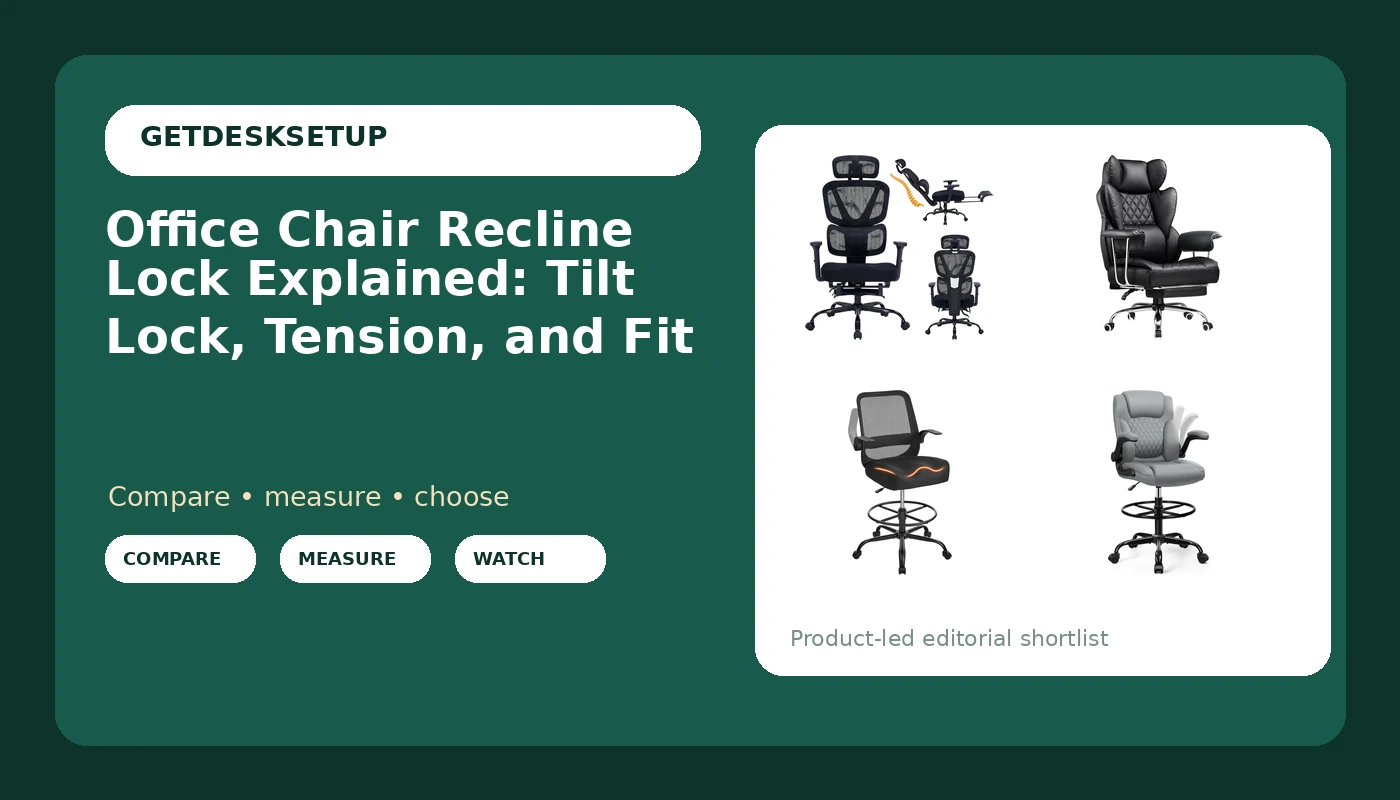
| Ergonomic Office Chair with Footrest, 90-160° Reclining Mesh Desk Chair, 3D Armrest & 2D Headrest & Comfortable Lumbar Support, High Back Mesh Computer Chair for Home Office Long Hours, Tilt Lock | Desk work where you want to change back angle through the day | A stated 90 to 160 degree recline with a tilt lock, 3D armrests, and a 2D headrest |
| COMHOMA Big and Tall Office Chair, High Back Leather Gaming Chair with Footrest, Executive Ergonomic Office Chair with Pocket Spring Lumbar Support and with Outward Fixed Soft Armrests | Larger frames that want a leather chair with a footrest | Big and tall build, pocket spring lumbar support, outward fixed soft armrests |
| Drafting Chair for Standing Desks, 500LBS Capacity Tall Office Chair with Adjustable Height, Foot Ring, Flip-Up Armrests, Thick Curved Seat for Home Office, Drawing, and Creative Work | Standing desk users who want to sit at counter height | A stated 500 lb capacity, a foot ring, and flip-up armrests |
| Drafting Chair, Tall Office Chair for Standing Desk, High Executive Leather Ergonomic Computer Chair with Adjustable Height and Flip-Up Armrest for Counter Height Desk, Grey, Pack of 1 | Counter height setups where a leather finish matters | Adjustable height, flip-up armrests, grey leather finish |
The chair with a stated tilt lock: Ergonomic Office Chair with Footrest
A stated range is more useful than the word ergonomic, because it tells you where the back can stop. Ninety degrees is close to upright, which is a typing angle. Near 160 degrees you are almost lying back, which is a reading or resting angle. The lock earns its keep in the middle of that range, where you want a slight lean without the chair deciding how far to go. The 3D armrests move in more directions than the fixed armrests on the COMHOMA chair, which matters if your elbows do not land where a fixed pad puts them.
Who should skip it: anyone who needs a stated weight capacity, since this listing does not state one, and anyone whose desk is a standing desk and who wants a chair tall enough to sit at counter height. The two drafting chairs below cover that job.
Big and tall with a footrest: COMHOMA Big and Tall Office Chair
Fixed armrests are the trade-off worth naming up front. They do not move up, down, or sideways, so if your elbows land above or below the pads, you cannot correct it with a wrench. The listing also does not state a weight capacity or a recline range, so if you are near the top of a typical big and tall range, check the current listing text before you commit. Leather is the other difference: it holds a different feel against your back than the mesh chair above, and it is heavier to move when you rearrange a room.
Tall chair with a foot ring: Drafting Chair for Standing Desks, 500LBS Capacity
At counter height your feet lose the floor, and that is what the foot ring replaces. Without one, your legs hang and your lower back takes the load. The flip-up armrests let you push the chair under a standing desk when you raise the desk and stand, which is the whole point of pairing a tall chair with an adjustable desk. Height changes how the recline lock feels: sit higher and the same back angle puts more of your weight behind the pivot, so tilt tension usually needs to go up before the lock is worth using.
Counter-height leather option: Drafting Chair, Tall Office Chair for Standing Desk
Compare this one carefully with the drafting chair above. This listing does not state a foot ring, and it does not state a weight capacity, so if either of those matters to you at counter height, that is the deciding difference. What it does state is a leather finish in grey, which is a look decision as much as a material one. Flip-up armrests appear on both, and they solve the same problem: a tall chair with fixed arms cannot get close enough to a desk that sits above your lap.
Prices and availability may change. Product images, names, and retailer links are matched to verified listings. No current price, rating, stock status, or measured result is stated here without current evidence.
How an office chair recline lock works
Under the seat there is a mechanism that either catches the back at an angle or lets it swing. On most chairs one paddle does the whole job: push it once to lock, push it again to release. Some chairs lock at set positions, a few clicks through the range, while others lock anywhere you stop. Neither is better for every person. A click stop is easier to return to; a free lock lets you find an angle your body actually wants.
Tilt tension is the separate control, usually a knob under the front of the seat or a dial on the side. Tension does not lock anything. It changes how much force it takes to push the back down, which is why a chair can feel like it is fighting you even when the lock is released.
That is the office chair recline lock explained in one line: the lock decides whether the back holds or floats, and the tension dial decides how hard it is to move. A desk chair recline lock and a task chair recline lock are the same part under two names, and an ergonomic chair recline lock is the same lever again, just described with a friendlier word on the product page.
Tilt tension, seat depth, and the numbers to check
The lock is the last thing you adjust, not the first. Seat height comes first, because everything above it depends on where your feet and knees land. Seat depth comes next, because the backrest can only support your lumbar support if your hips are far enough back in the seat. Only then does recline matter, and only then does tilt tension matter. Armrest and headrest height come last, since both are positioned relative to a back angle you have already chosen.
Here is the order I use when setting up a chair for someone:
- Set seat height so your feet rest flat and your knees sit close to hip level.
- Set seat depth so there is a small gap behind your knees, then sit back against the backrest.
- Release the lock and turn tilt tension until the back moves when you lean but does not drop you backward.
- Engage the lock at your typing angle, then check that the lumbar support still meets your lower back.
- Adjust armrest height so your shoulders stay down, set the headrest for reading only, and check the casters roll freely on your floor.
Practical guidance for daily use
- Lock the back for focused typing, release it for calls, reading, and video meetings.
- Do not use the lock to hide a seat that is too deep or too tall. It cannot fix either one.
- On a drafting chair at counter height, raise tilt tension before you lock the back, because the higher seat changes the leverage.
- Flip-up armrests are for getting in and out and for sliding under a desk, not a replacement for adjustable armrest height.
- If the chair rolls badly, look at the casters and the floor, not the recline. Those are separate problems.
Which option should you choose?
Choose the Ergonomic Office Chair with Footrest, 90-160° Reclining Mesh Desk Chair, 3D Armrest & 2D Headrest & Comfortable Lumbar Support, High Back Mesh Computer Chair for Home Office Long Hours, Tilt Lock when you want a stated recline range and a tilt lock and you work at a standard desk height. Choose the COMHOMA Big and Tall Office Chair, High Back Leather Gaming Chair with Footrest, Executive Ergonomic Office Chair with Pocket Spring Lumbar Support and with Outward Fixed Soft Armrests when you want a leather big and tall chair with a footrest and you can live with armrests that do not adjust. Choose the Drafting Chair for Standing Desks, 500LBS Capacity Tall Office Chair with Adjustable Height, Foot Ring, Flip-Up Armrests, Thick Curved Seat for Home Office, Drawing, and Creative Work when your desk is a standing desk and you sit at counter height with a stated capacity and a foot ring. Choose the Drafting Chair, Tall Office Chair for Standing Desk, High Executive Leather Ergonomic Computer Chair with Adjustable Height and Flip-Up Armrest for Counter Height Desk, Grey, Pack of 1 when you want that counter height format in grey leather and do not need a stated foot ring or capacity.
None of these listings states seat depth in inches, and seat depth is the number that decides fit for most people. Measure your own before you order: sit against the back of your current chair and measure from the backrest to the point where the seat edge meets the back of your knee. If you cannot say that number, you are guessing, and the lock will not save you.
The bottom line
A recline lock is a stop, not a comfort setting. Use it to hold a working angle for typing, release it when you want the chair to move with you, and set tilt tension first so the release position is usable. Pick the chair that fits your measurements and your desk height, then spend ten minutes adjusting it in the order above. A correctly adjusted mid-priced chair beats a badly adjusted expensive one every time, and the lever under the seat is where that adjustment starts.