I size chairs with a tape measure, not a spec sheet, and the most common home office failure I see is not a cheap chair. It is a well-built chair designed around a 5'10" body and sold to someone 5'2". The seat drops all the way down, the feet still dangle, a cushion appears under the desk, and the lumbar curve ends up somewhere between the shoulder blades. Office chair ergonomics for petite adults is a measurement problem before it is a shopping problem: seat height, seat depth, and where the lumbar support actually lands on your back. Get those three right and everything else, the armrest, the recline, the tilt tension, becomes adjustable detail. Get them wrong and no headrest, footrest, or mesh back rescues the posture. This guide covers what each number decides, how the four chairs below differ, and who should skip each one.
Related: Standing desk height for petite users →
Quick answer
If you want office chair ergonomics for petite adults explained in one sentence: get the seat low enough that both feet rest flat, get the seat shallow enough that you can sit back against the lumbar support with a couple of inches of clearance behind your knees, and set the armrests at elbow height with the shoulders relaxed. Most petite adults sit near the bottom of a chair's height range, so the lowest setting matters more than the highest. Seat depth is the harder number, because a seat that is too long pushes you forward and breaks contact with the backrest. A footrest or a genuinely shallower seat fixes what no cushion fixes. None of the four chairs below is right in every case; each fits a different desk, body, and session length.
Four useful options
| Model | Best fit | What stands out |
|---|---|---|
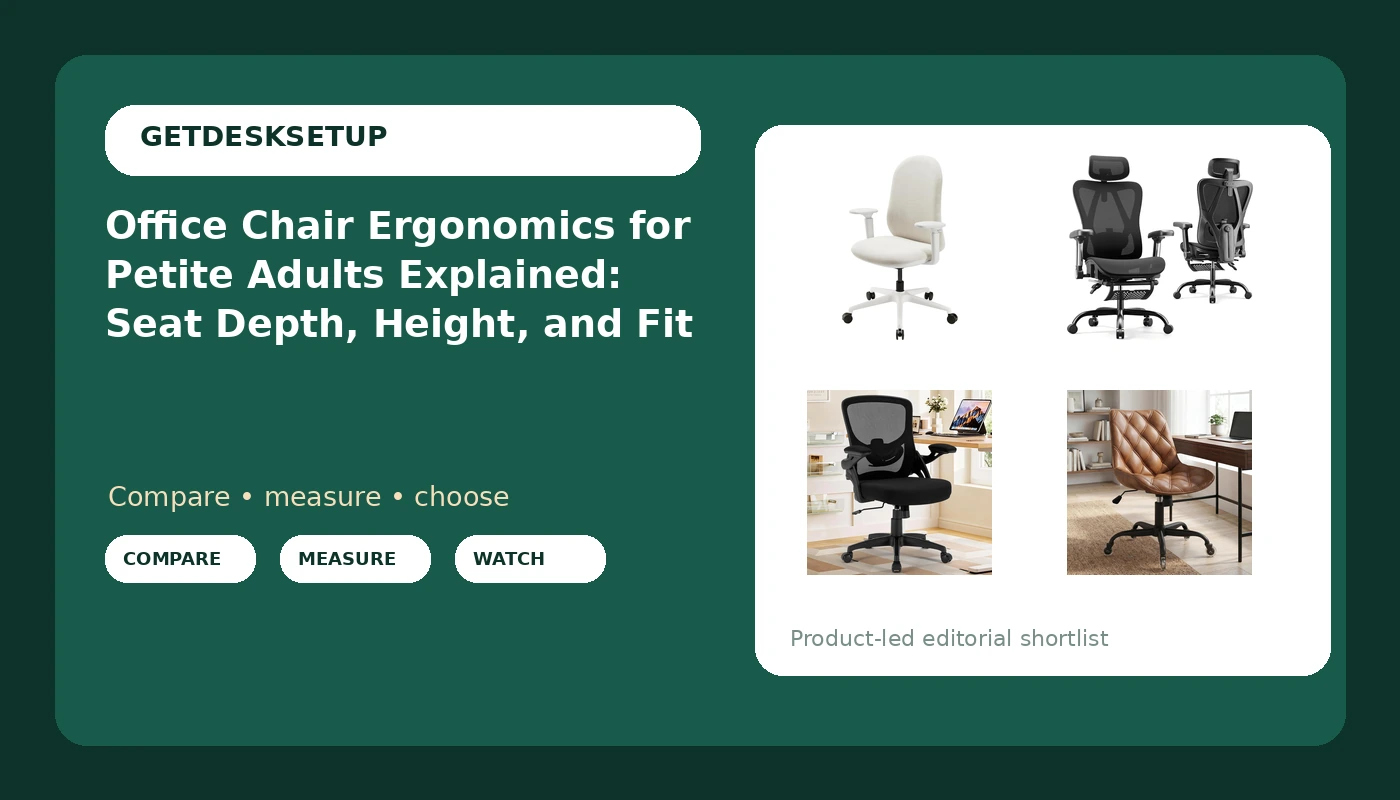
| Mochi Chair Petite Ergonomic Chair (Cream) | Petite adults who want a frame sized from a smaller body | Listing positions it for women and children; height-adjustable |
| Ergonomic Office Chair with Footrest | Long sessions that include recline | Footrest, adjustable lumbar support, 5D armrests, 135° recline, 2D headrest |
| Office Chair, Ergonomic Desk Chair with Adjustable Lumbar Support | Shallow desks and small rooms | Adjustable lumbar support and flip-up armrests on a mesh mid back |
| Armless Office Chair, Mid Back Modern Desk Chair with Rubber Wheels | Buyers who want no armrests at all | Armless frame, rubber wheels, 360 swivel, PU leather in brown |
The petite-first pick: Mochi Chair Petite Ergonomic Chair
The case for this one is its starting point, not its feature list. A chair whose smallest setting is still too tall forces a workaround: a footrest, a cushion, a stack of books under the desk. The listing names women and children as the design target, which is the closest thing to a petite-first brief in this set. The trade-off is what the name does not promise: no headrest, no footrest, no 5D armrest language. If your sessions run long and you want to lean back with your head supported, this is the wrong tool, and the mesh chair with the footrest below is the better answer. Skip it if you are tall, if you share the chair with someone over six feet, or if you need it to double as a recliner.
The full-feature pick: Ergonomic Office Chair with Footrest
This is the chair in the group that answers the most petite-fit problems in one frame, and it is also the one that asks the most of your room. A high back with a footrest and a 135° recline needs floor space behind the desk, and the footrest needs clearance underneath. The adjustable lumbar support is the feature to test first: run it to its lowest setting and check whether the pad lands in the small of your back, not above your belt line. Mesh keeps it cool over a long day. Skip it if the desk is shallow, if you want a minimal footprint, or if you never recline and would rather not pay for a headrest you will not use.
The small-room pick: Office Chair, Ergonomic Desk Chair with Adjustable Lumbar Support
A mid back chair solves a petite problem without trying: with no headrest, there is nothing to push your chin forward when the headrest is sized for a taller torso. The flip-up armrests do the same job for the desk edge, which matters when your desk is shallow and your armrests sit higher than your elbows. The adjustable lumbar support is the piece I would check before buying, because the question is never whether a chair has lumbar support, it is whether the pad can drop low enough to touch your back. Skip this one if you want head support while reclining, or if you prefer a fabric seat to mesh.
The armless pick: Armless Office Chair, Mid Back Modern Desk Chair with Rubber Wheels
Going armless is a legitimate strategy, not a compromise, for a shorter user. If every armrest you try sits above your relaxed elbows, the desktop becomes your armrest and the chair stops fighting you. The rubber wheels are the second useful detail: they roll without scratching a hard floor, and wheel size matters because larger wheels raise the whole seat. The trade-offs are real. Without armrests, your forearms need the desk at the right height, and PU leather runs warmer than mesh over a long afternoon. Skip it if you want arm support during eight-hour days, if your desk is fixed too high for relaxed shoulders, or if you share the chair with someone who needs armrests.
Prices and availability may change. Product images, names, and retailer links are matched to verified listings. No current price, rating, stock status, or measured result is stated here without current evidence.
How office chair ergonomics for petite adults starts with seat height and seat depth
Two numbers decide most of the fit. The first is your popliteal height, the distance from the floor to the crease behind your knee, measured with the shoes you actually work in. A chair's lowest seat height should land at that number or slightly below it. When the lowest setting is higher, your feet hang, the weight of your legs pulls on the front edge of the seat, and your pelvis rolls back. That roll is why dangling feet turn into lower back ache an hour later.
The second is seat depth: the distance from the back of your buttocks to the crease behind your knee, minus an inch or two of clearance. A seat deeper than that pushes you forward, and the moment you slide forward, the backrest stops touching your lumbar spine. This is the quiet failure of desk chair ergonomics for petite adults. The chair looks right, the lumbar pad is right there, and it never touches your back because the seat is two inches too long.
A fixed desk adds a third constraint. Raise the chair to meet the desktop and your feet leave the floor; lower the chair to the floor and your wrists bend up to type. The usual fixes are a footrest, a keyboard tray, or an adjustable desk, and the order matters: set the chair to your body first, then bring the work surface to your hands. If you are also resetting desk height, the same measuring logic applies, which is what standing desk height for petite users → walks through.
Lumbar support, armrest, and recline: office chair body alignment for petite adults
Adjustable lumbar support earns its place because on a chair built for a taller body the fixed pad sits above your belt line, in the middle of your back, where it does nothing for the curve it was designed to hold. You want the pad in the small of your back and you want to move it down. A strap-on lumbar pillow is the cheap version of the same fix; a chair with adjustable lumbar support is the version you do not have to re-strap every week.
Armrests are the second mismatch. Armrest height should put your elbows near 90 degrees with the shoulders relaxed. Fixed armrests sized for a taller user tend to sit high, so you either shrug up to use them or hold your arms away from them, and neither position survives a long day. Flip-up armrests and 5D armrests give you somewhere to go; an armless chair sidesteps the problem by making the desktop the armrest.
Recline and tilt tension decide whether you use the backrest at all. A few degrees of recline is normal and healthy. A tension knob set stiff enough for a heavier user means a petite user has to push with their feet to lean back, which rolls the chair backward and breaks the seat depth you just set. Loosen the tension until the chair follows you instead of resisting you. A headrest only helps if it drops to the base of your skull; if it sits behind the top of your head, it pushes your chin forward. Casters count too, because bigger wheels raise the entire chair, and swapping wheels changes your seat height.
- Measure your popliteal height with your work shoes on, and write the number down.
- Measure from the back of your buttocks to the crease behind your knee, then subtract one to two inches for target seat depth.
- Sit at the desk and note your elbow height with the shoulders relaxed; that is your armrest target.
- Compare those numbers against the lowest seat height and the lumbar adjustment range of any chair you are considering, not the highest.
- Sit for twenty minutes with your feet flat and check whether you drift forward; drifting means the seat is too deep or the tilt tension is too heavy.
Setting the chair up once it arrives
- Set the chair to your body before you touch the desk: seat height first, then seat depth, then lumbar position, then armrests, then tilt tension.
- Keep a footrest under the desk if the lowest seat height still leaves your heels off the floor. It is cheaper than a second chair.
- Loosen tilt tension until you can recline by relaxing rather than pushing, and tighten it only if the back feels loose.
- Choose flip-up or no armrests when fixed armrests push your shoulders up, and let the desktop carry your forearms instead.
- Re-measure after any change. New work shoes, a different desk, or larger casters all move the numbers. A complete office chair ergonomic setup for petite adults is five numbers, not a feeling, and it takes ten minutes to redo.
Which option should you choose?
Choose the Mochi Chair Petite Ergonomic Chair when you want a frame the listing sizes for women and children and you do not need a headrest or a footrest. Choose the Ergonomic Office Chair with Footrest when you want adjustable lumbar support, 5D armrests, a 2D headrest, and a 135° recline, and you have the floor space for a high back with a footrest behind a deeper desk. Choose the Office Chair, Ergonomic Desk Chair with Adjustable Lumbar Support when the room is small and the desk is shallow, and you want armrests that flip up so the chair tucks away. Choose the Armless Office Chair, Mid Back Modern Desk Chair with Rubber Wheels when armrests are the specific problem you are removing and your floor is hard.
One caveat: the listings above do not publish measured seat height or seat depth ranges here, and I will not guess them. Before you buy, read the current listing for those two numbers and compare them to the measurements you took. If a listing does not state them, ask the seller rather than assuming.
The bottom line
Office chair ergonomics for petite adults comes down to three measurements you can take at home in ten minutes: popliteal height for seat height, buttock-to-knee length for seat depth, and elbow height for armrests. A chair is a fit problem before it is a brand problem, and the cheapest correct setup beats the most expensive wrong one every time. Any of the four chairs above can work if its lowest seat height and its lumbar adjustment land where your body needs them. None of them can work if the seat is two inches too deep or the armrests sit above your elbows. Measure first, buy second, then re-measure once the chair is assembled and you have sat in it for an hour.