Most people pick a home office setup desk lamp the way they pick a phone charger: they buy the one that looks right in a photo, plug it in, and find out three weeks later that it throws a bright band across the monitor or that its base has eaten the only clear patch of desktop they had left. Lighting is a layout decision before it is a brightness decision. Where the head sits, how the lamp attaches, and what the light does to the surface underneath decide whether you can read a printed page without leaning into your own shadow. Mount type comes first, and everything else follows from it.
Related: How to Plan a Small Home Office Layout →
Quick answer
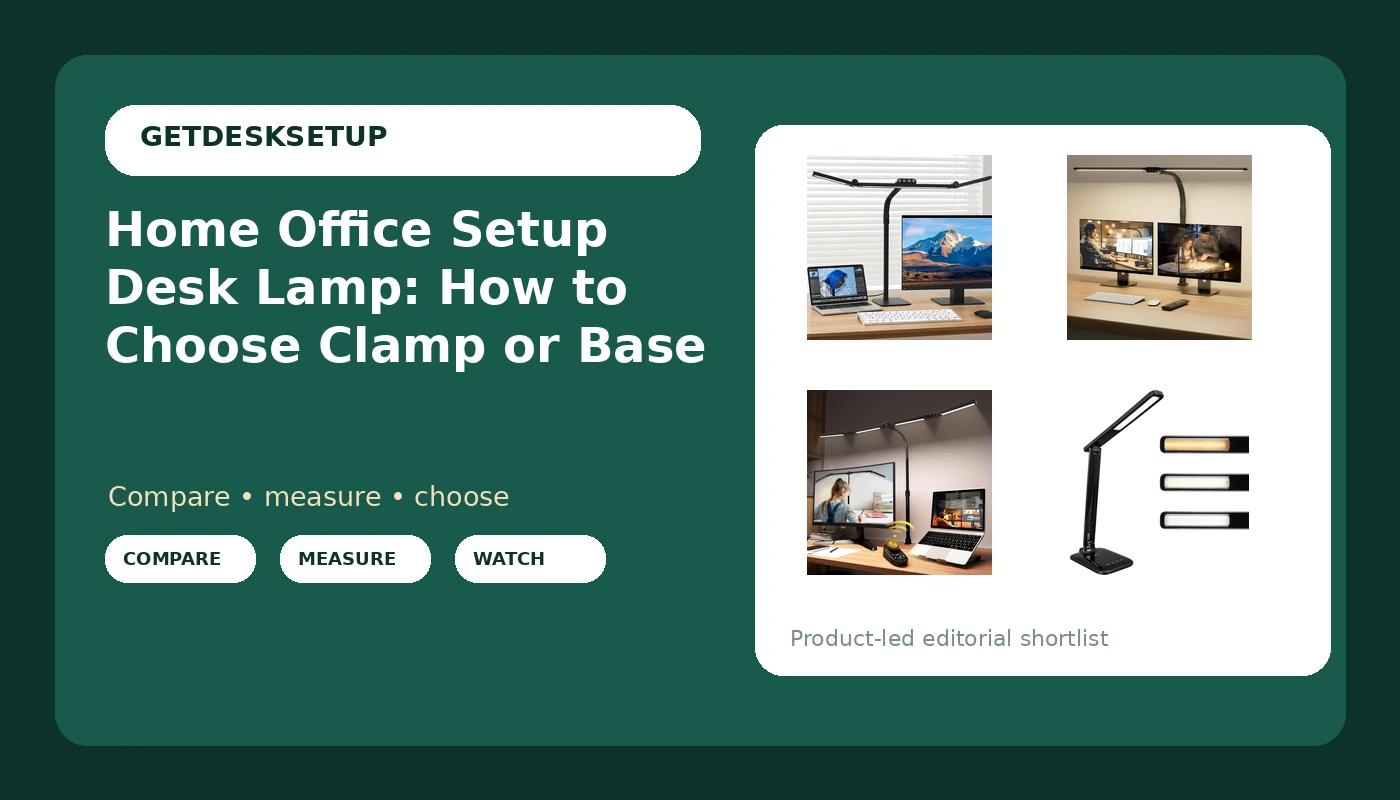
Choose the mount before anything else. A clamp lamp needs a free desk edge, no apron or drawer bank in the way, and nothing already bolted to that edge. A base lamp needs clear surface of its own and a reachable power outlet. Head count comes second: one head covers a keyboard, two heads cover a keyboard plus a document, and a four-head lamp is for a wide desk or a shared surface. Controls come last, and a remote only earns its place when the lamp is clamped behind a monitor where you cannot reach the head. That is the home office setup desk lamp explained by mounting, reach, and control rather than by a brightness number on the box.
Four useful options
| Model | Where it fits | What stands out |
|---|---|---|
| LED Desk Lamp for Home Office with Base, 28.2" Adjustable Gooseneck Swing Arm Ultra Bright Desk Light | Desks with no clampable edge | Free-standing base with a 28.2-inch adjustable gooseneck swing arm |
| SIBRILLE LED Desk Lamp for Home Office | Monitor-centered desks needing broad coverage | Clamp mount, double head, gooseneck, color changing |
| Adjustable LED Desk Lamp with Clamp & Remote, Wide 4-Head | Clamped lamps you want to control from your chair | Clamp mount, remote control, wide four-head layout |
| OttLite Slimline LED Desk Lamp, Black | Narrow desks where a low-profile body matters | Slimline form in black |
Free-standing base: LED Desk Lamp for Home Office with Base
The trade-off is footprint. A base occupies desk area, and on a 48-inch desk that area is already competing with a keyboard, a mouse pad, and a notebook. The long gooseneck is what makes the base workable: you can set the base toward the back corner and still bring the head forward over the work. Cable planning matters more with a base lamp than people expect, because the cord runs from the base to the nearest outlet rather than riding the desktop. Decide where the base sits, then route the cord along a desk leg, and only then commit to the position.
Clamp, two heads: SIBRILLE LED Desk Lamp for Home Office
Two heads solve a specific problem and create a smaller one. They solve coverage: a single head tends to leave one side of a wide desk dark, which is exactly where people put the notebook they are copying from. They create glare risk, because two light sources have twice as many angles to reflect off a glossy panel. The fix is positioning, not a different lamp. Put the clamp at the rear edge, splay the two heads toward the outer thirds of the desk, and keep both heads below the bottom edge of the screen. Before you order, check the clamp against your edge thickness and make sure no drawer bank or cable tray sits under that edge.
Clamp with a remote: Adjustable LED Desk Lamp with Clamp & Remote
Four heads on a bar is a lot of lamp, and it suits a specific desk: something 55 inches or wider, or a surface shared with a second person. On a narrow desk it over-lights the middle and pushes you to run it at its lowest setting all day, which is not the same as having a well-placed light. The remote is genuinely useful for a standing desk, because you can adjust without walking around the desk or reaching over a raised surface. Plan for one extra item on the desk, though. A remote with no home is a remote you will find under the keyboard in a month.
Slim profile: OttLite Slimline LED Desk Lamp
A slim body earns its place when the space above the desktop is tight: under a low shelf, in front of a shallow monitor, or on a desk that also holds a printer. What it does not do is cover a wide surface. If your work spreads across 40 inches of desk, a slimline single-head lamp leaves the far side dark and you will end up moving a notebook into the light rather than moving the light onto the notebook. That is the honest trade: a small footprint costs coverage.
Prices and availability may change. Product images, names, and retailer links are matched to verified listings. No current price, rating, stock status, or measured result is stated here without current evidence.
What a home office setup desk lamp actually has to do
A desk lamp is task lighting. It is not there to light the room. It is there to raise the light level on the specific rectangle where your keyboard, mouse, and notebook sit. That distinction matters because most home offices fail on contrast rather than on total brightness. If the wall behind the monitor is dim and the screen is bright, your eyes readjust every time you look up. A task lamp that also washes a little light onto the wall behind the screen narrows that swing without turning the room into an office lobby.
Think in lighting layers. Ambient light comes from a ceiling fixture or a window. Task light comes from the lamp on the desk. Accent light is whatever you have on a shelf or behind a monitor. One task lamp cannot replace ambient light in a dark room, and it should not try. If the room has no ceiling fixture, plan two lamps or one desk lamp plus a floor lamp rather than buying a brighter desk lamp and aiming it at the wall.
Room layout decides where the lamp can go. In a corner desk setup, the natural spot is the corner itself, which is often exactly where the monitor already is. On a long straight desk, the lamp belongs to the side of your dominant hand if you write on paper, or behind and slightly to the side of the monitor if you do not. Both positions assume the head can be angled, which is why a gooseneck or a swing arm matters more than raw output.
Then there is monitor distance. The closer the screen sits to your eyes, the less tolerance you have for a bright source inside your field of view. At a typical viewing distance, a head that sits level with the bottom third of the screen and points down and away tends to be invisible in the panel. A head that sits above the top edge of the screen and points forward is not. Sit down, find the spot where a lamp head would be out of your line of sight, and buy for that spot. If no such spot exists, the answer is a different desk arrangement, not a different lamp.
Matching the mount to your desk, not to the photo
Mount is the one specification that can make a lamp unusable, and it is the one most listings bury. Clamp lamps need an edge. The clamp has to reach around the desktop, so the desk needs a free rear or side edge with no apron, no drawer bank, and no steel frame in the way. A glass top usually rules a clamp out. A cable tray screwed to the underside often rules it out too, because the tray occupies the space the clamp needs.
Base lamps need surface instead. A base lamp is the right answer for a desk with a thick apron, a glass top, a solid rear panel, or a rear edge already holding a monitor arm clamp. The cost is desk area, and on a 48-inch desk a lamp base plus a monitor arm base plus a keyboard leaves very little clear space. Measure the footprint before you commit.
Desk height changes what the lamp has to do. A standing desk that travels through a wide range takes a clamped lamp with it, which is fine, and leaves a base lamp sitting on a shelf behind the desk, which is not. If you alternate between sitting and standing, keep the lamp on the desk surface so the relationship between head, keyboard, and eyes stays constant at both positions. That relationship is also a chair pairing question: the higher your chair puts your eyes, the more likely a head that was fine when seated becomes visible when you recline or drop the seat.
Power is part of the plan. A lamp needs an outlet, and the outlet is usually behind the desk where you cannot see it. Choose the lamp position first, then the cable route, then whether you need an extension or a second power strip. Cable planning is not decoration here. A lamp cord that crosses the travel path of a standing desk will pull, snag, and eventually fail. Leave slack in a loop and run the cord down a leg rather than across the gap.
Ventilation matters in the same small way. Do not clamp a lamp onto the same rear edge where a monitor or laptop vents heat, and do not wedge a base lamp against a wall where its power brick has nowhere to breathe.
- Measure the desk edge. Clamp lamps need a free edge, so check thickness and look for an apron, drawer, or tray underneath.
- Measure the clear footprint you can spare. A base lamp needs surface that is not already spoken for by a keyboard, a monitor arm, or a notebook.
- Count heads against the work. One head covers a keyboard, two heads cover a keyboard plus a document to the side, and a four-head bar covers a wide or shared desk.
- Pick the control you can actually reach. A switch on the head is fine when the head is in front of you. A remote earns its place when the lamp is clamped behind a monitor.
- Plan power and the cable route before you mount anything. Identify the outlet, leave slack for a standing desk, and keep the cord out of the travel path.
Practical notes before you order
- Confirm the mount type on the listing itself. A product name describes a lot and specifies less, and base or clamp is the one detail you cannot work around.
- Test the clamp with the desk empty. Clamping onto an edge that already carries a monitor arm mount is how desktops crack.
- Set the head below eye level and angle it down. Light aimed across the desk instead of into your eyes does more for reading than extra output does.
- Match the light color to the rest of the room. A very cool white lamp in a room lit by warm bulbs reads as glare even when it is not bright.
- Keep the outlet reachable. A work from home setup desk lamp that has to be unplugged and re-plugged to move is a lamp you will stop moving.
- Leave room to adjust. A home workspace setup desk lamp only helps if you can still swing the head when the desk is fully loaded.
Which option should you choose?
Choose the LED Desk Lamp for Home Office with Base when the desk has no usable edge for a clamp, or when the rear edge is already taken by a monitor arm. Choose the SIBRILLE LED Desk Lamp for Home Office when you want the desktop surface left clear and you need two heads to cover a keyboard and a document at once. Choose the Adjustable LED Desk Lamp with Clamp & Remote when the lamp will live clamped behind a monitor on a wide desk and you need to change settings from your chair. Choose the OttLite Slimline LED Desk Lamp when a low-profile body matters more than coverage, and confirm the mount on the listing before you order.
None of these four lamps fixes a room with no ambient light, and none of them removes glare from a glossy monitor if the head points at the panel. A home office workstation desk lamp is a positioning tool. If the desk edge, the outlet, or the space above the desktop rules out the mount you want, the correct move is a different mount type rather than a brighter lamp in the same place.
The bottom line
A home office setup desk lamp is a small purchase that goes wrong for structural reasons, not optical ones. Clamp or base decides whether the lamp can attach at all. Head count decides whether the light lands where your work actually is. The control decides whether you will keep adjusting it after the first week. Measure the edge, measure the footprint, check the outlet, and route the cord before you mount anything. Then buy the lamp that matches those measurements, and skip the one that only matches the photo.