Home office setup clearance is the measurement set no product page prints: the floor depth your chair needs to roll back, the gap behind the desk for a power outlet and cable slack, the vertical travel a monitor arm needs above the desktop, and the wall run an L shaped return eats. Buy the four pieces in this build in the wrong order and you end up with a screen 20 inches from your face, seating you cannot lean back in, and a cable that pulls the monitor out of level within a week. Buy them in the right order and a spare bedroom becomes a workstation that still works a year later.
Related: Monitor Arm Height and Viewing Distance: Getting Both Right →
Quick answer
Measure first, buy second. Four numbers decide this build: your seated elbow height, which sets desk height; the floor depth your chair needs behind the desk edge; your preferred monitor distance, usually somewhere between 20 and 30 inches from your eyes; and the width of the wall the desk will sit against. The desk sets the footprint, the monitor mount takes the base off the desktop, the stool decides whether you perch or sit, and the headset keeps both hands on the keyboard during calls. Home office setup clearance explained in one line: the desk and the seating decide whether the room works, and everything else is an accessory you can swap later. Nothing below is called the best or the quietest, because those verdicts need evidence this page does not have.
4 useful options
| Model | Best fit | What stands out |
|---|---|---|
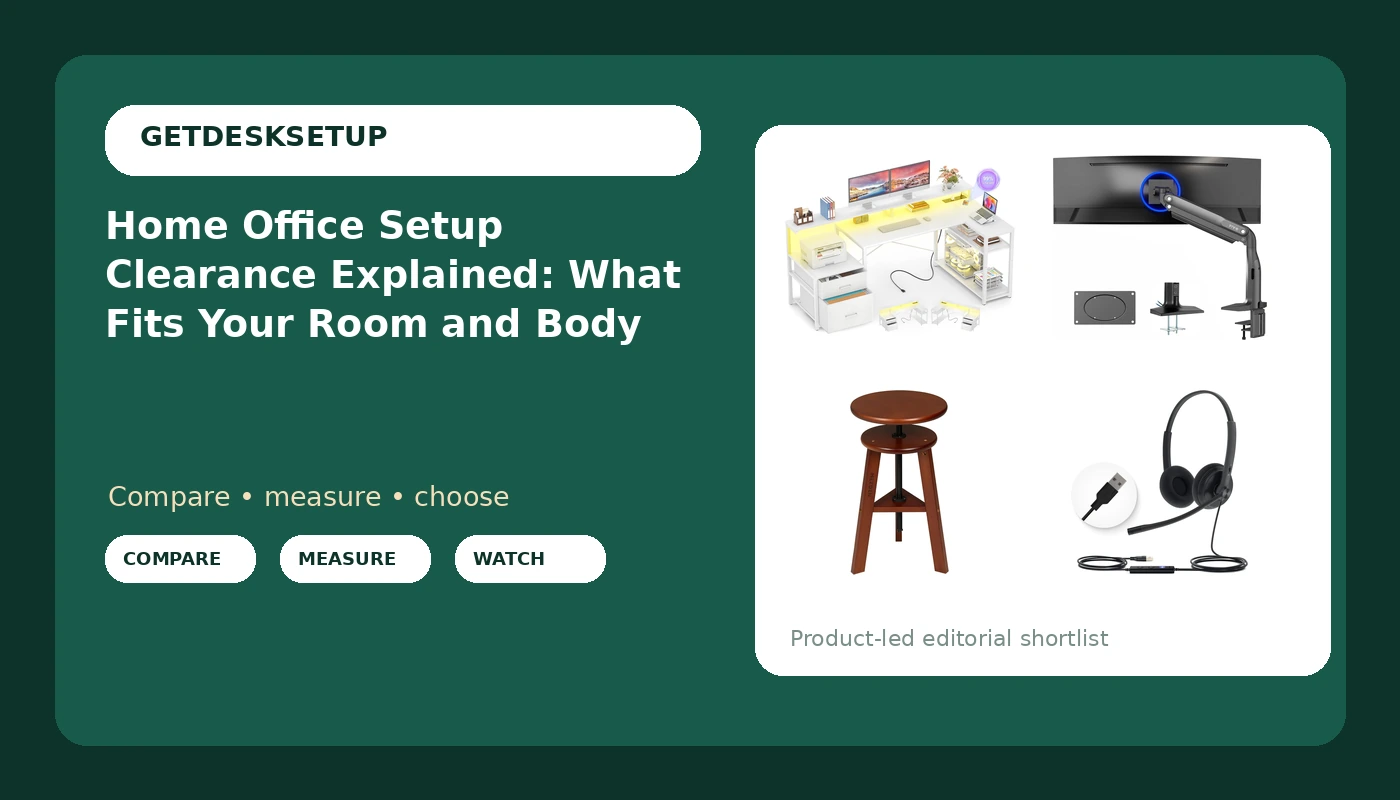
| Aheaplus L Shaped Desk with File Drawer, Reversible L Shaped Gaming Desk | Corner rooms and small footprints | Reversible L shape with a built-in file drawer |
| VIVO Ultrawide Monitor Desk Mount, USB, up to 49 inch Screens, STAND-V100HU | Ultrawide and large single-screen setups | Desk-mounted arm for screens up to 49 inches, with USB |
| MEEDEN Artist Wooden Drafting Stool: Adjustable Height Art Stool for Studio | Perch sitting and studio work | Wooden, adjustable-height stool |
| Yealink UH34 Lite Wired Headset,USB-A, Noise Canceling Mic,in-Line Controls | Wired calls from a desktop or dock | USB-A headset with a noise canceling mic and in-line controls |
The desk: Aheaplus L Shaped Desk with File Drawer, Reversible L Shaped Gaming Desk
An L shaped desk is the one piece here that changes the room, so it goes first. The reversible return decides whether it fits: in a bedroom where the only free wall is on the left, you flip the return, and in a room where the window is on the right, you flip it the other way. The file drawer takes the paperwork that would otherwise pile up on the desktop, which matters more than it sounds when the second leg is doing double duty as a printer stand.
Before you order, measure the wall run for both legs and check the desktop height stated in the listing against your seated elbow height. If the two do not line up within an inch or so, plan for a footrest or a different desk. Home office workstation clearance breaks into three numbers here: the depth of the return leg, the width of the main leg, and the floor you leave in the middle for the chair. Skip this desk if the room is narrower than both legs plus your chair's push-back depth, or if you want a motor, because nothing in this listing describes a height-adjustable surface.
The monitor mount: VIVO Ultrawide Monitor Desk Mount, USB, up to 49 inch Screens, STAND-V100HU
The monitor mount is the most direct way to buy back desktop space, and it is also the piece most likely to be installed in the wrong order. Clamp the base to the desk first, check the clamp is seated flat, then hang the arm, then load the screen, then tighten the joints. Reversing that order, loading a screen onto a loose arm, is how people crack a desktop and strip a clamp screw.
A mount listed for screens up to 49 inches covers an ultrawide or one large monitor. Monitor distance is the number that changes with the mount: once the base is gone you can push the screen back to 24 or 30 inches and still keep the desktop clear, which you cannot do with a stand. Cable planning matters more here than anywhere else in the build, because a cable that pulls on the arm changes the monitor angle within a week. Run slack at both ends and anchor the cable to the underside of the desk, not to the arm. Skip this mount if your desktop is glass, if the listing's clamp range does not match your desktop thickness, or if the screen has to hang on a wall.
The seating: MEEDEN Artist Wooden Drafting Stool: Adjustable Height Art Stool for Studio
Read this listing for what it is: a wooden, adjustable-height stool built and described for art and studio work. It is not a task chair with a backrest, and if your plan is eight hours of sitting, chair pairing is the decision that matters most in the whole build. A stool works when you perch for short stretches, alternate between sitting and standing, or work at a drafting table where your feet rest on a rail rather than flat on the floor.
The adjustable height is the part to size correctly. Set it so your elbows sit near 90 degrees against the work surface and your feet are supported, then check that the seat does not cut into the back of your thighs. Home workspace setup clearance is mostly about this: the chair or stool needs floor space behind the desk edge to move, and even a fixed-footprint stool needs a few inches of travel if you want to reach the far end of an L.
Skip this stool if you need lumbar support, armrests, or a rolling base, and skip it if you plan to sit for a full workday. It is the right piece for a studio, a drafting table, or a standing desk used in short sitting blocks, and the wrong piece as the only seat in a 40-hour office.
The headset: Yealink UH34 Lite Wired Headset,USB-A, Noise Canceling Mic,in-Line Controls
The headset is the last piece and the one that gets forgotten until the first call. A wired USB-A headset is the low-drama option: no pairing, no charging, no battery to think about at 4pm. The noise canceling microphone is the part that matters on a call, and in-line controls put mute and volume within reach without touching software.
The clearance question here is a port question. USB-A means you need a free USB-A port on the laptop, dock, or desktop tower, and a laptop with only USB-C ports needs an adapter you should buy in the same order rather than the morning of a call. Check the cable length against the distance from your chair to the machine, then route it with the rest of the cable planning: under the desk edge, over the arm, never across the floor where a chair wheel can catch it.
Skip this headset if you need wireless range, if you walk around during calls, or if your machine has no USB-A port and you do not want an adapter. For a fixed desk with a tower or dock, wired is one less thing to charge.
Prices and availability may change. Product images, names, and retailer links are matched to verified listings. No current price, rating, stock status, or measured result is stated here without current evidence.
How to measure home office setup clearance before you buy
Seated elbow height sets desk height. Sit in the chair or stool you plan to use, let your arms hang, and measure from the floor to the bottom of your elbow. That number, give or take an inch, is the desktop height you want. Common fixed desktops sit somewhere around 28 to 30 inches, which suits plenty of people and misses plenty of others, so check the stated height in the listing rather than assuming. If the desk is taller than your elbow height, a footrest and a keyboard tray close the gap; if it is shorter, nothing fixes it.
Chair pairing is a depth decision, not a style decision. Seat depth should land within an inch or two of your thigh length, measured from the back of your knee to the back of your hip. Too deep and the front edge digs into your calves; too shallow and your thighs carry weight they should not. Then add the floor: budget 30 to 36 inches of depth behind the desk edge for a rolling chair and your legs, and less for a stool that stays put.
Monitor distance is the number people guess. Push the screen back until the far edge of the panel is roughly an arm's length away, then check that the top of the screen sits at or just below eye level. With a desk-mounted arm you can hit that distance and keep the desktop; with a stand you often cannot, because the base eats the depth you need.
Write the numbers down. A room that fits a given wall run, desktop height, and viewing distance is a different room from one that fits none of them, and the difference shows up as a returned desk.
Home office setup clearance is a room measurement too
A work from home setup clearance check is the same exercise as an office fit-out, just with fewer walls to choose from. The desk is the easy part. The room is where most setups fail.
Room layout comes first: tape the footprint on the floor, including the chair's travel and the door swing. A desk that blocks the door or the closet is a desk you will resent by week two.
Power outlet count decides where the desk can go. Count the outlets on the wall you want, then add what the build needs: monitor, dock, laptop, lamp, charger. One outlet and a five-plug strip is workable; one outlet across the room is not, because a cable across a walking path is a trip hazard that no clip solves.
Ventilation is the one people ignore. A closed door plus a running laptop plus a monitor adds heat, and a warm room makes a long afternoon worse. If the only desk wall is against a radiator or under a shelf that blocks airflow, move the desk.
Lighting layers matter more than the lamp you buy. Aim for a window at the side of the screen rather than behind or in front of it, one task light over the keyboard, and a soft light behind the monitor so the wall is not a black hole your eyes keep adjusting to.
Cable planning protects everything else. Leave slack at both ends of every cable, anchor runs to the underside of the desktop rather than to the arm, and label the power bricks. A taut cable is a cable that will move something.
- Tape the desk footprint and the chair's push-back depth on the floor, then live with the outline for a week before ordering.
- Measure seated elbow height and write down the desktop height you need.
- Decide seating first: a task chair with a back, or a perch stool, not both by accident.
- Decide whether the monitor sits on a stand or a desk-mounted arm, and confirm the mount fits the desktop you chose.
- Plan the power outlet and the cable route before the boxes arrive, and leave slack at both ends.
Practical checks before you click buy
- Measure the wall run for both legs of an L shaped desk, not just the long side.
- Check the desktop height and thickness stated in the listing against your elbow height and your mount.
- Confirm the screen size against the mount's stated range before you hang anything.
- Count free USB-A ports before buying a wired headset, and add the adapter to the same order if you need one.
- Leave two to three inches behind the desk for cable slack and ventilation.
Which option should you choose?
Choose the Aheaplus L Shaped Desk with File Drawer, Reversible L Shaped Gaming Desk when you have a corner or two short wall runs and want the file drawer built in. Choose the VIVO Ultrawide Monitor Desk Mount, USB, up to 49 inch Screens, STAND-V100HU when you run one large or ultrawide screen and want the desktop back. Choose the MEEDEN Artist Wooden Drafting Stool: Adjustable Height Art Stool for Studio when you perch, draft, or alternate sitting and standing. Choose the Yealink UH34 Lite Wired Headset,USB-A, Noise Canceling Mic,in-Line Controls when your calls happen at a fixed desk with a free USB-A port.
One caveat on all four: this page states no measured result, no price, and no rating, because those change. Verify the desktop height, the mount's stated screen range, the stool's height range, and the port type against the current listing before you order, and treat any fit note here as a starting measurement rather than a promise.
The bottom line
Home office setup clearance is a tape measure job, and the tape measure is cheaper than a returned desk. The Aheaplus L Shaped Desk sets the footprint, the VIVO mount lifts the screen off the desktop, the MEEDEN stool decides how you sit, and the Yealink headset handles the calls. Get desk height, chair pairing, and monitor distance right and the room works; get them wrong and no accessory fixes it. Write your numbers down, check them against the current listings, and buy the setup that fits the room you actually have.