Two people can spend the same amount on a desk setup and end up with completely different rooms. One gets a chair that fits and a desk that stays steady. The other gets a top that shakes the moment it reaches standing height and a chair they keep re-adjusting all afternoon. The difference is rarely the total spend. It is the order of the spend, and that is what home office budget tiers are for: sorting a room into the parts your body contacts for eight hours, the parts that hold your gear, and the parts that mostly just need to look finished. Get the order wrong and no amount of money fixes it.
Related: Best Ergonomic Office Chairs for Standing Desks →
Quick answer
Home office budget tiers are a spending order, not a spending level. Tier one is the chair, because seat depth and the desk height range decide whether you can sit correctly at all. Tier two is the surface and the screen position, where monitor distance and wobble at the top of the range matter more than motor speed. Tier three is everything that meets your hands and your cables, which is where wrist rests and cable planning belong. That is home office budget tiers explained in one sentence: fit first, structure second, finish last. A modest build assembled in that order beats an expensive one assembled in the wrong one, and the four items below sit at different points in that sequence rather than competing with each other.
Four useful options
| Model | Best fit | What stands out |
|---|---|---|
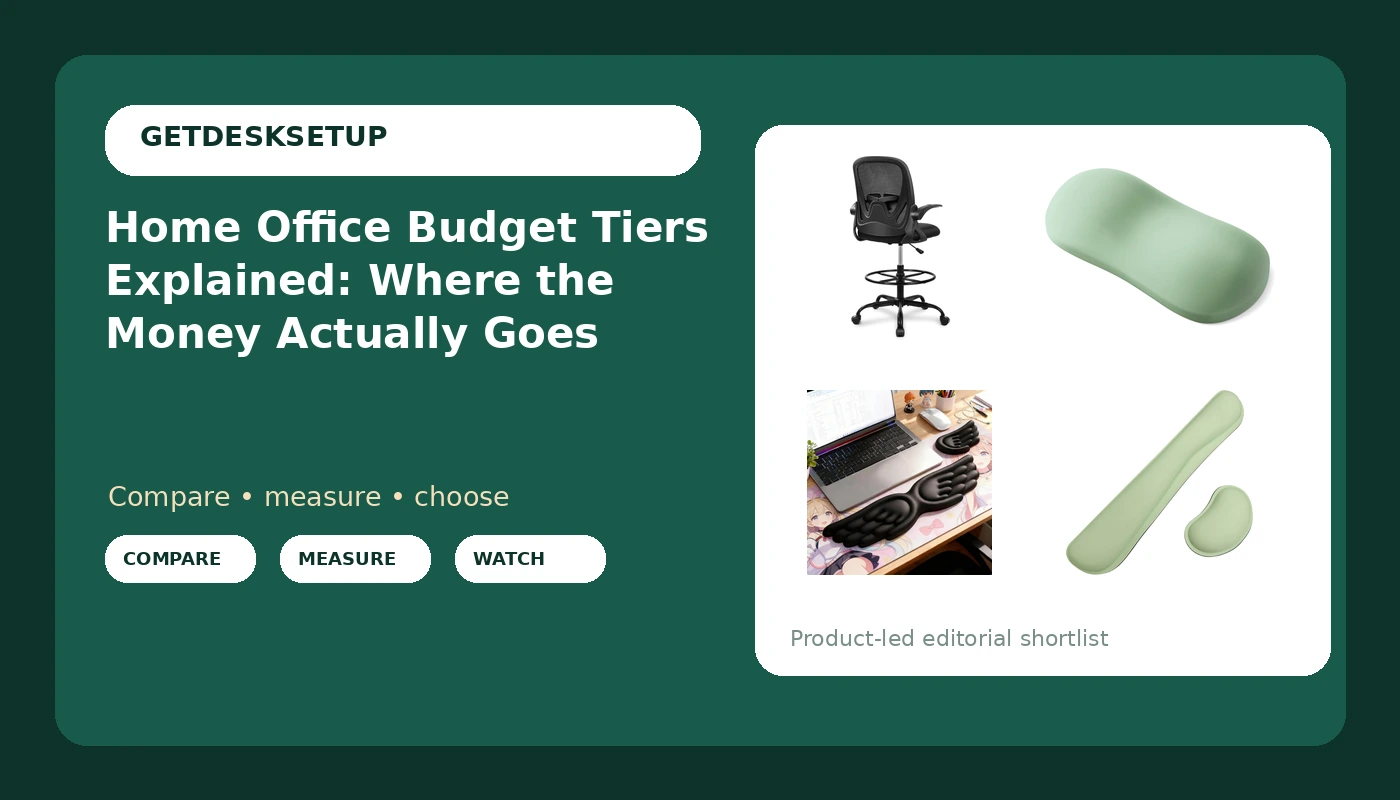
| Primy Drafting Chair Tall Office Chair with Flip-up Armrests Executive Ergonomic Computer Standing Desk Chair with Lumbar Support and Adjustable Footrest Ring (Black) | Tall desks and standing-desk pairings | Flip-up armrests, a lumbar support panel, and an adjustable footrest ring |
| MOSISO Silicone Wrist Rest Pad, Ergonomic Inflatable Support for Mouse | The smallest possible first step | Silicone construction, inflatable, sized for the mouse side |
| Angel Wing Wrist Rest Ergonomic Memory Foam Keyboard Mouse Set (Black) | Keyboard and mouse support in one purchase | A memory foam set that covers both input positions |
| Bloss 2 Green Wrist Rest for Mouse & Keyboard, Ergonomic Wrist Support | Two-piece support in one order | Separate mouse and keyboard rests in green |
The tier-one spend: Primy Drafting Chair Tall Office Chair with Flip-up Armrests Executive Ergonomic Computer Standing Desk Chair with Lumbar Support and Adjustable Footrest Ring (Black)
A drafting chair is a specific tool, not a default. It sits higher than a standard task chair, which is exactly why it pairs with a standing desk or a tall fixed surface and why the footrest ring exists: at that seat height your feet need somewhere to land. The flip-up armrests are the detail that matters most day to day, because they let the chair slide under a desktop without a fight. Who should skip it: anyone who has not yet measured their own seat depth against a tape and matched it to the listing, and anyone whose desk has no way to sit lower. Drafting geometry is not interchangeable with task-chair geometry, and buying it as a generic upgrade is how people end up returning chairs.
The smallest first step: MOSISO Silicone Wrist Rest Pad, Ergonomic Inflatable Support for Mouse
People compare work from home budget tiers as if the tiers were about brand prestige. They are not. This pad is the clearest proof: it is the lowest-commitment item in this article, and it addresses one specific problem, which is the angle your wrist holds when your hand rests beside a mouse. Inflatable is the honest trade-off. You gain adjustability and you take on a product that can lose air, so it suits someone willing to top it up rather than someone who wants a shape that never changes. Skip it if you want the keyboard side covered too, or if a soft fixed surface is what you are after.
The paired-input option: Angel Wing Wrist Rest Ergonomic Memory Foam Keyboard Mouse Set (Black)
This is the middle of the accessory range, and the middle is where most work from home office budget tiers land once the chair is settled. Memory foam gives you a consistent surface with no inflation step and no slow leak, which is the trade you make against the inflatable pad above. The catch is that a set assumes a conventional layout: keyboard centred, mouse just to the right, both at the same height. If your monitor distance or keyboard angle pushes your mouse far off to one side, a paired set can leave a gap in the middle of your reach. Skip it if you use a split keyboard or only ever need mouse-side support.
The two-piece option: Bloss 2 Green Wrist Rest for Mouse & Keyboard, Ergonomic Wrist Support
Home workspace budget tiers only make sense once you accept that placement beats padding. Two separate pieces let you position each rest under the exact point where your wrist lands, which is the part a joined bar cannot do, and it is why this set behaves differently from the paired set above even though both cover keyboard and mouse. The colour is not a footnote either. On a black desk, a green rest marks the boundary of your input zone, which helps when you are resetting a room layout after moving a monitor arm. Skip it if you want a single continuous surface, or if you have already measured and know one wide rest spans your whole reach.
Prices and availability may change. Product images, names, and retailer links are matched to verified listings. No current price, rating, stock status, or measured result is stated here without current evidence.
The home office budget tiers, ranked by what your body notices
The reason the order matters is that each tier constrains the next one. A chair that puts your elbows above the desktop makes every wrist rest the wrong height, no matter how good it is. That is chair pairing in practice: the seat height, the seat depth, and the armrest position set the height at which your forearms arrive at the desk, and only then does an accessory have a correct thickness to match.
Start with seat depth in inches, measured from the back of your knee to the back of your hips while sitting. Compare it to the stated range on the listing, not to a photograph. Then check the desk height range, and specifically what the desk does at the top of that range, because a surface that is steady at sitting height and shaky at standing height fails the person it was bought for. Monitor distance comes next, roughly an arm's length so your eyes can rest without leaning in, and that distance is set by the arm or the stand, not by the panel.
Room layout and lighting layers belong to the same calculation. A desk facing a window with no shade is a glare problem you will solve by moving the desk, and moving the desk usually means moving the power outlet plan with it. None of this costs more money. It costs one measuring session before you order anything.
Measuring before you buy
- Sit in your current chair and write down the seat depth in inches, measured from the back of your knee to the point where your hips meet the seat.
- Measure your desk height with the surface empty, then raise a standing desk to the top of its range and press down hard on the front edge to check for movement.
- Set your monitor distance by extending one arm from your seated shoulder to the screen, and note whether your current stand or arm can hold that position.
- Trace your cable route from the monitor to the wall and count how many cables cross a joint that moves when the desk rises.
- List every device that needs power and mark the nearest outlet, then decide whether a strip is needed before you buy the desk rather than after.
Wiring, light, and air: the tier nobody plans for
- Cable planning starts with slack, not clips: a cable that pulls tight at standing height will drag your monitor out of angle within a week.
- Route power once. A single power outlet plan, with the strip fixed to the underside of the desk rather than hanging, keeps the moving parts moving.
- Ventilation matters more in a small room than most buyers expect, especially when a door stays closed for eight hours.
- Lighting layers beat one bright source: an overhead light, a task lamp, and whatever daylight reaches the desk solve different problems.
- Leave the footrest ring and the floor around it clear, because a tall seat needs somewhere for your feet to land when you switch positions.
Which option should you choose?
Choose the Primy Drafting Chair Tall Office Chair with Flip-up Armrests Executive Ergonomic Computer Standing Desk Chair with Lumbar Support and Adjustable Footrest Ring (Black) when you work at a standing desk or a tall fixed surface and need a seat that matches that height. Choose the MOSISO Silicone Wrist Rest Pad, Ergonomic Inflatable Support for Mouse when you want the cheapest possible test of whether mouse-side support helps you at all. Choose the Angel Wing Wrist Rest Ergonomic Memory Foam Keyboard Mouse Set (Black) when your keyboard and mouse sit in a conventional side-by-side arrangement and you want both covered with one purchase. Choose the Bloss 2 Green Wrist Rest for Mouse & Keyboard, Ergonomic Wrist Support when you want the two rests placed independently, under the exact points where your wrists land.
One caveat applies to all four. Fit claims here are about geometry, not comfort: the chair has to match a measured seat depth and a desk height range, and the wrist rests have to sit at a height that your chair and desk already set. Without those measurements, none of these purchases is verifiable in advance, and the only thing a higher tier buys you is a more expensive guess.
The bottom line
Home office budget tiers are a sequence: chair, then surface and screen position, then hands and cables. Spend on the tier that constrains the others, measure before you order, and treat the accessories as the last step rather than the first. A drafting chair that matches a measured seat depth and a desk that holds still at standing height will do more for a working day than any amount of extra spending piled onto the top of a setup that was never sized correctly in the first place.