App control on a standing desk is the feature that sells the desk and the one buyers most often misunderstand. It does not move the desk for you, it does not fix a frame that rocks at standing height, and it does not replace a tape measure. What it does is put the same up and down commands you already have on a keypad onto a phone screen, which matters in a few narrow cases: the keypad sits under the desktop lip where you cannot read it, two people share the desk and their saved heights differ by several inches, or you want a reminder that nudges you to change posture. Everything else about standing desk app control is packaging around a small convenience. If you cannot state your own seated elbow height in inches, start with how to measure desk height for your body before you compare any of this.
Related: Standing Desk Height Ranges Explained →
Quick answer
Here is standing desk app control explained in one sentence: it is a control method, not a capability. A desk with an app still has to fit you, and it still has to be steady at the height you actually stand at. Check the height range, the desktop depth, and the lift capacity first, then decide whether the app earns its place. Do not label a product the quietest, fastest, safest, or best unless the available evidence supports that distinction.
Four useful options
| Model | Best fit | What stands out |
|---|---|---|
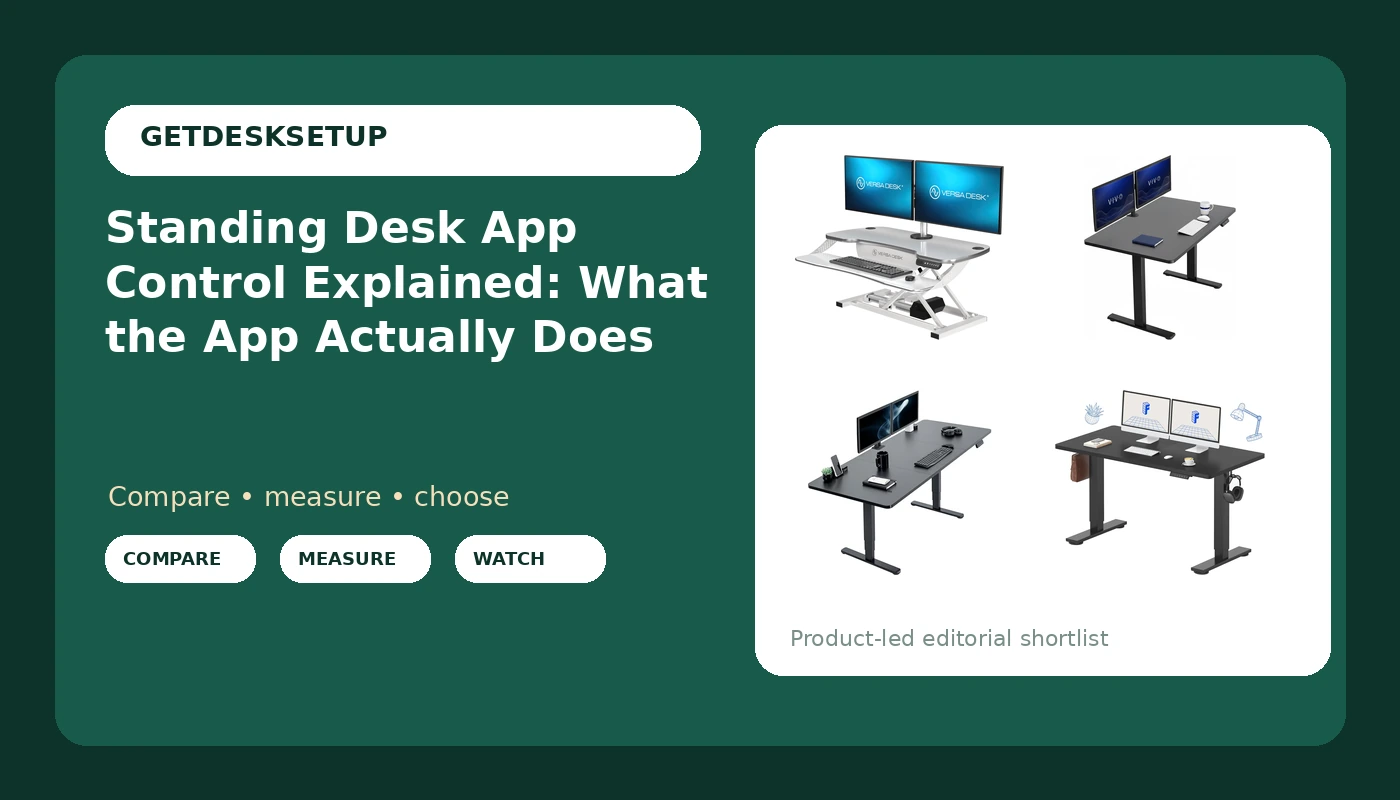
| VERSADESK PowerPro Elite 36” x 24" App Controlled Electric Standing Desk Converter | A desk you already own, plus a small room | App controlled lift, USB charging port, ships fully assembled, raises up to 20 inches |
| VIVO Black 48 x 30 in Standing Desk, DESK-KIT-1B5B | Short walls and single monitor setups | 48 inch width with a 30 inch desktop depth |
| VIVO Black 71 x 30 in Standing Desk, DESK-KIT-2B7B | Two monitors side by side | 71 inch width with a 30 inch desktop depth |
| FLEXISPOT 55×24 Inch Electric Standing Desk, Black | Middle size rooms and a full desk on power | 55 inch width with a 24 inch desktop depth |
App control: VERSADESK PowerPro Elite 36” x 24" App Controlled Electric Standing Desk Converter
A converter is a different purchase from a desk, and the app question lands harder here than anywhere else in this list. This unit sits on the desk you already own, so the app raises the platform, not the desk underneath it. The number that decides whether it works in your room is the stack: your existing desk height plus the converter's lift. The second number is the footprint. A 36 by 24 inch base needs that much clear desktop, and if your current desktop depth is 24 inches, the converter takes the entire surface and leaves nothing for a notebook or a mug. The 80 lb lift capacity is the figure to hold against your monitor, laptop, and anything else that rides up with it. Arriving assembled removes the step that goes wrong most often on desk builds. Who should skip it: anyone who wants the keyboard and the monitor to stay at a fixed distance while standing, because a converter moves both together, and anyone whose existing desk is already unstable, because a converter on a shaky desk is a taller shaky desk.
Compact full desk: VIVO Black 48 x 30 in Standing Desk, DESK-KIT-1B5B
This is the smallest full desk in the group and the one that fits a short wall. Two numbers do the work. Width is about the room: measure the wall segment, then subtract clearance for a baseboard, a door swing, or a radiator. Desktop depth is about you: 30 inches gives you room to push a monitor back to a distance where your eyes can rest, which is the complaint that sends most people shopping again after a year on a shallow top. The name does not advertise app control, so treat it as a keypad desk and confirm the control box on the listing if a phone connection is the reason you are here. Who should skip it: two large monitors side by side, or a monitor plus a full size tower sitting on the desktop. At 48 inches wide you can run a monitor and a laptop, not a wall of glass.
Wide full desk: VIVO Black 71 x 30 in Standing Desk, DESK-KIT-2B7B
Same desktop depth, far more width, and that width is the entire point. It holds two monitors side by side with space between them, or a monitor plus a laptop on a stand, without either one hanging off the edge. The cost is floor and wall space. A 71 inch desk needs a 71 inch wall segment plus the clearance you want at each end, and it will dominate a small room in a way the 48 inch version does not. If you have the wall, the wide top is usually the cheaper fix for a crowded desktop than buying a second desk a year later. If you do not, do not talk yourself into it. As with the smaller VIVO, the app question is a control box question: check what the listing ships with before you assume a phone will talk to it.
Mid-size electric: FLEXISPOT 55×24 Inch Electric Standing Desk, Black
The middle of the group, and the one with the shallowest desktop depth. At 55 inches wide it splits the difference between the two VIVO desks. At 24 inches deep it does not, and that depth is the number to think about hardest. It decides how far back a monitor can sit and how much of your forearm can rest on the top while you type. It is an electric standing desk, so it moves on its own power, and the app question is the same one as before: the name does not advertise phone control, so confirm the control box before you buy if that is the feature you are chasing. Who should skip it: anyone with a large monitor on a deep stand, or anyone who wants the desktop to hold a keyboard, a notebook, and a lamp without shuffling things around at the end of the day.
Prices and availability may change. Product images, names, and retailer links are matched to verified listings. No current price, rating, stock status, or measured result is stated here without current evidence.
What standing desk app control actually changes
A height adjustable desk with an app is not a different machine. It is the same frame, the same legs, and the same control box with a second way in. The control box is the small module that takes commands and drives the motors, and it decides whether an app exists at all. If the box has no radio in it, no app appears later, no matter what the marketing photos suggest. That is why the same control box turns up under listings for sit stand desk app control and under plain keypad models, sometimes at the same price.
What the app usually adds is bookkeeping. A memory preset is a saved height, and most keypads already store two to four of them. The app puts those presets on a screen with names, which matters when two people share the desk and their heights differ by several inches. Some apps add a sit and stand schedule, a reminder that fires at intervals you choose, and a readout of the current height. None of that changes how the desk performs. It changes how often you bother to change posture, which is the actual goal.
What the app does not add is anything structural. It cannot widen a height range, raise a lift capacity, or settle a frame that rocks. Anti collision, the feature that stops travel when the desk meets an obstacle, lives in the control box and works whether you press a keypad or a phone. A dual motor frame, where each leg carries its own motor, is about even lifting and load sharing, not about the app. Neither feature appears or disappears because a phone can pair with the desk.
Where the app falls short is availability. A phone with a dead battery is not a control panel. Firmware updates can change behavior between one month and the next. Pairing is one more thing that can fail on a morning when you simply want the desk up. For most buyers the honest position is that the app is a convenience layer on top of a mechanism that has to be right first, and the mechanism is what you should be shopping for.
How to size an app controlled desk to your body
If you are shopping for height adjustable desk app control, do the sizing work below before you look at a single feature list. The app will still be there when the numbers line up.
- Sit in the chair you actually use, feet flat, and measure from the floor to the crease of your bent elbow. That number is your seated desktop height.
- Stand in your usual shoes and measure from the floor to your bent elbow again. That is your standing target, and it is usually several inches higher than buyers guess.
- Compare both numbers against the desk's stated height range. Both should sit inside the range with room above and below, not pinned to the very top, because the top of the travel is where wobble shows up.
- Add up the load that will ride on the top: monitor, monitor arm, laptop, lamp, speakers. Compare the total against the lift capacity, and leave headroom rather than planning to use every pound.
- Measure the room last. Minimum desk width plus clearance at each end, and enough desktop depth behind the keyboard for your monitor distance.
What to check in the first week
- Route every cable so nothing is taut at standing height. A cable that pulls on a monitor arm changes the monitor angle within a week, and monitor arm cable routing is easier to fix on day one than on day thirty.
- Load the cable tray before you fully tighten its screws. A tray that sags under its own screws is usually a tray that was tightened while empty.
- Use the grommet, if the top has one, for the run down to the floor, and leave slack for the full travel of the desk rather than the height it happens to be at.
- Check crossbar clearance at the lowest setting with your knees under the top. A frame that fits standing can still catch a chair or a shin when it drops.
- Save and label a memory preset for each person at the desk, then confirm the app still connects after any phone update, so nobody has to guess a number.
Which option should you choose?
Choose the VERSADESK PowerPro Elite when you already own a desk you like, the app is the feature you actually want, and you have a clear 36 by 24 inch desktop to give it. Choose the VIVO Black 48 x 30 in Standing Desk when the wall is short and one monitor plus a laptop is the whole setup. Choose the VIVO Black 71 x 30 in Standing Desk when you have the wall for it and two monitors need to sit side by side. Choose the FLEXISPOT 55×24 Inch Electric Standing Desk when you want a full electric desk in the middle size and 24 inches of desktop depth is enough for how far back your monitor sits.
Treat any stand up desk app control claim as a question about the control box, not about the frame. The names and sizes above are the evidence available here. Height ranges, motor configurations, and control box details are not stated in those names, so verify them on the listing before you buy. A name that does not mention an app is not proof that one is missing, and a name that does is not proof that it works well.
The bottom line
App control is a small, real convenience attached to a large, unglamorous decision. The desk still has to fit your seated and standing elbow heights, hold your load, and stay steady at the height you use most. Settle those three things first, using the tape measure and the numbers on the listing rather than the feature list. If the app comes along at a price you are willing to pay, take it and use it for the one thing it does better than a keypad: keeping two people's saved heights separate. If it does not, a keypad and a tape measure will still get you a better setup than a phone and a guess.