A desk pad for gamers is not decoration. It is the surface your mouse sensor reads, the layer that decides whether your wrist sits level with your keyboard, and the barrier that keeps a controller edge, a headset cable, and a spilled drink off the finish underneath. The trouble is that most listings hand you a size in inches and nothing else, so people buy a mat that is two inches too narrow for their mouse sweep or a couple of millimeters too thick for the chair height they already dialed in. This page covers what material, thickness, and dimensions actually change at the desk, and it matches four verified listings to the desks and bodies they fit.
Related: Cable Management for a Gaming Desk Without Drilling →
Quick answer
A desk pad for gamers only works when three numbers line up with your body and your desk. Mat length has to cover your keyboard plus a full mouse sweep, not just the keyboard. Mat thickness has to be low enough that your wrist does not break upward when your hand rests on the pad. Mat density has to be firm enough that the mouse feet do not sink into the surface. Cloth and felt add friction, which helps small precision movements and slows big swipes. A smooth leather-look pad adds almost no friction and wipes clean faster. Measure your desk and your keyboard before you compare a single listing.
4 useful options
| Model | Best fit | What stands out |
|---|---|---|
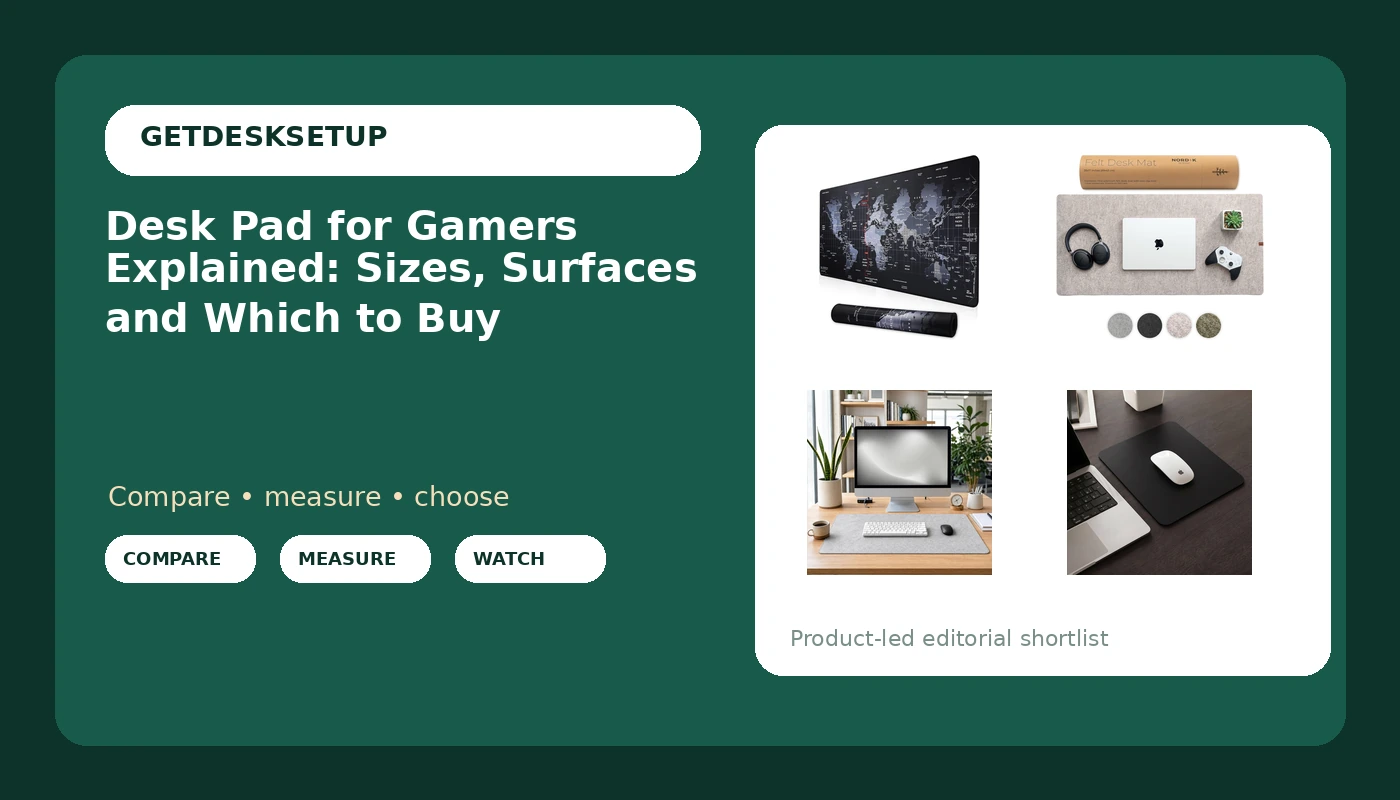
| XXL Professional Large Mouse Pad & Computer Game Mouse Mat (35.4×15.7×0.1IN, Map) (90 * 40 Map) | A desk 48 in wide or more with keyboard and mouse on one surface | Listed at 35.4 x 15.7 in with a 0.1 in profile |
| Nordik Felt Desk Mat – Large Felt Desk Pad – Stone Oat Beige 35 x 17 in | Wide coverage in felt and a lighter color | Listed at 35 x 17 in in a stone oat beige felt |
| Large Felt Desk Mat for Keyboard and Mouse,Computer Desk Pad Protector | Felt coverage across the working zone on a narrower desk | Felt top over a desk-protecting base |
| Non-Slip Waterproof Leather Mouse Pad Desk Pad Protector, Black 9×8 in | Mouse-only use, small desks, and travel | Listed at 9 x 8 in with a waterproof top |
The full-desk surface: XXL Professional Large Mouse Pad & Computer Game Mouse Mat
A 35.4 in pad needs a desk at least 48 in wide if you want an inch of margin on each side, and about 16 in of clear depth so the pad sits fully on the desktop instead of hanging over the front edge. Overhang is what makes a large mat curl at the front. The other trade-off is cleaning: one continuous cloth surface collects dust across the whole working area, and you cannot lift half of it while leaving the rest down. If your cable management runs a raceway along the back of the desk, place the pad in front of the raceway cover rather than on top of it, or the pad edge will press the cover loose. A 0.1 in mat raises your wrist by about 2.5 mm, which is a wrist position change, not a desk height change, so do not re-cut your chair settings around it.
The wide felt option: Nordik Felt Desk Mat – Large Felt Desk Pad – Stone Oat Beige 35 x 17 in
This is the same coverage class as the mat above with a different material and color. Felt sits between cloth and a hard pad in feel: quieter under a mouse, warmer under a wrist, and often sold as a writing pad for gamers because the fiber surface takes a pen without the skate of a coated top. The beige top cuts both ways. A light surface bounces more light back toward your eyes, so if your desk lamp lumens are high and the lamp sits low and close, a beige mat can add glare you did not have with a dark pad. Change the lamp angle or output before you blame the pad. Felt also needs a lint brush more often than cloth, because fiber pills where a mouse repeatedly crosses the same line. The 48 in minimum desk width still applies.
The everyday felt mat: Large Felt Desk Mat for Keyboard and Mouse,Computer Desk Pad Protector
This one is sized for the working zone rather than the whole desktop, which matters on desks narrower than 48 in where a full-width mat would overhang the front edge. Two things to check before you buy. First, measure the keyboard plus your mouse sweep. A mat that only fits the keyboard leaves your mouse on the bare desktop, and that is where tracking gets inconsistent across a wood grain, a pen mark, and a reflective patch. Second, compare the mat thickness against your keyboard feet. A mat thick enough to work as a protector will also lift the front of a low-profile keyboard, and that changes your typing angle more than most people expect.
The compact mouse pad: Non-Slip Waterproof Leather Mouse Pad Desk Pad Protector, Black 9×8 in
A desk mat for gamers usually means a keyboard and mouse mat, so read the listed size carefully here: nine by eight inches covers a mouse arc with a little margin and nothing else, which keeps the keyboard on the bare desktop. On a narrow top, 36 in or 40 in wide, that is often the only pad that leaves room for a monitor stand base or a notebook. The smooth waterproof top has almost no drag. Some players like that for fast movement, and others find small aim corrections harder to control on it. A non-slip base matters more on a small pad than a large one, because a small pad can rotate during a fast swipe. It is also the easiest of the four to drop in a bag.
Prices and availability may change. Product images, names, and retailer links are matched to verified listings. No current price, rating, stock status, or measured result is stated here without current evidence.
What a desk pad for gamers actually changes
Surface and sensor first. Optical and laser sensors read texture, not color, so a printed graphic on a cloth mat does not hurt tracking the way people assume. What changes tracking is consistency. A bare desktop with a wood grain, a pen mark, and a reflective patch feeds the sensor different data across one swipe. A pad gives it one surface for the whole stroke. That is the real argument for a pad, and it has nothing to do with looks.
Friction second. Cloth and felt create drag. Drag helps when you are making one or two millimeter corrections and hurts when you need to cross fifteen inches of desk in a single motion. Low-sensitivity players who aim with the arm tend to prefer a large surface with less drag. High-sensitivity players who aim from the wrist tend to prefer a denser cloth or felt top that steadies small movements. Neither preference is a defect in the other player.
Wrist geometry third. A pad raises the wrist relative to the desk. If the keyboard sits on the same pad, both hands rise together and the relationship between them stays the same. If only the mouse sits on a pad, that hand rises alone and the wrist extends a little more. This is why a mouse-only pad pairs better with a keyboard that is already raised at its back feet. Chair height and footrest angle are set by your legs. A two millimeter pad does not belong in that calculation.
Protection, noise, and cables last. A pad absorbs drink rings, controller scuffs, and keyboard wear, and it damps the sound of a mechanical keyboard and a mouse landing. It also changes your cable plan, and this is the part people skip. A headset cable that crosses the front of the desk will drag the pad edge, and a pad that slides is worse than no pad. Route the cable behind the pad with a cable sleeve or an adhesive clip, and keep a raceway along the back edge clear. An old office term for this object is a desk blotter for gamers; the job has not changed, only the material.
Desk pad for gamers explained: thickness, density, and what to measure
Two specs do most of the work, and neither is printed clearly on most listings. Mat thickness is the vertical dimension, usually listed in inches or millimeters. Mat density is how much the surface compresses under a mouse foot, and it is rarely stated at all. You infer density from the material and from whether the edge is stitched or plain. Thickness runs from about 1.5 mm on thin cloth to 5 mm on padded protectors, and thicker is not better. Thickness should match how much desk protection you need, not how much cushion you want, because every millimeter you add lifts the wrist.
Here is the order that works:
- Measure the desk width and depth in inches, and write both down before you open any listing.
- Measure the keyboard width, then add your mouse sweep. Keyboard plus sweep is your minimum mat length.
- Set the chair first: feet flat, seat depth matched to your legs, footrest angle fixed where you want it. Only then measure how high your wrist sits above the desktop.
- Choose mat thickness from that wrist measurement. If your wrist already sits above the desktop, stay at the thin end, around 2 mm.
- Plan the cable path before the pad lands. A cable sleeve or an adhesive clip behind the pad edge keeps a monitor arm cable from pulling the mat out of position.
Practical guidance
- Cut a paper template of the pad footprint and leave it on the desk for a day. Paper costs nothing and shows you overhang before you buy.
- Place the pad in front of the cable raceway, never on top of it. A pad edge pressing on a raceway cover is how covers and trays start to bow.
- Check the pad edge against your monitor arm clamp. If the clamp base sits inside the pad footprint, the pad will bunch under it.
- Clean felt with a lint brush and cloth with a damp microfiber, then let both dry flat. A wet felt pad that dries on the desk can leave a mark.
- Keep the mouse-only pad for travel or a second desk, and keep the large pad for the main setup.
- If glare is the complaint, change the desk lamp angle or output before you change the pad. Pad color is rarely the real cause.
If the pad and the monitor arm clamp are fighting for the same corner of the desktop, how to place a monitor arm on a narrow desk covers the spacing math.
Which option should you choose?
Choose the *XXL Professional Large Mouse Pad & Computer Game Mouse Mat (35.4×15.7×0.1IN, Map) (90 40 Map) when your desk is 48 in wide or more and you want one continuous surface under the keyboard and mouse. Choose the Nordik Felt Desk Mat – Large Felt Desk Pad – Stone Oat Beige 35 x 17 in when you want the same wide coverage in felt and a lighter color that suits a wood or white desktop. Choose the Large Felt Desk Mat for Keyboard and Mouse,Computer Desk Pad Protector when your desk is narrower than 48 in and you only need felt across the working zone. Choose the Non-Slip Waterproof Leather Mouse Pad Desk Pad Protector, Black 9×8 in** when your desk is 40 in wide or less, when you need mouse coverage only, or when you want a pad that wipes clean and travels.
None of these four is the best pad in any absolute sense, and the listings here do not support a claim like that. Each one fits a different desk width, a different mouse sweep, and a different tolerance for cleaning. The listed dimensions are the whole decision. If your measurements put you between two sizes, take the smaller one: an overhanging pad curls at the front edge, and a pad that is slightly small still does its job.
The bottom line
Measure the desk, measure the keyboard plus your mouse sweep, and measure your wrist height after the chair is set. That order is desk pad for gamers explained in three steps, and it settles more than any material debate. Then match the surface to how you clean and how you aim: cloth and felt for control and quiet, a smooth waterproof top for a small footprint and easy wiping. All four listings here publish their sizes, so the numbers you take off your own desk are the only numbers that decide it. And whatever you pick, route the cables behind the pad rather than across it.